What is the Capability Action Planner Widget?
The Capability Action Planner is an Insights Dashboard widget that consolidates capability review data into one view. It helps leaders quickly identify:
Review participation trends
Performance gaps by behavior
Manager and seller alignment opportunities
This widget is designed to empower leaders to take data-driven action on the areas that matter most.
Who should use this widget?
The Capability Action Planner is most useful for:
Sales leaders
Enablement teams
Coaches and frontline managers
It works best when your organization:
Uses the Capability Review process consistently across teams
Has completed at least one review cycle (self- and manager reviews preferred)
Wants to identify performance gaps and prioritize development actions
Links digital learning content to behavioral insights
Consistently tags users to locations in Accelerate Prism (for visualization purposes)
Prefers a data-driven approach to enablement and coaching
Common use cases
Managers and admins can use this widget to:
Target enablement efforts by location or role
Identify low-scoring behaviors across teams
Track capability review completion rates
Align manager and seller scoring differences to uncover coaching needs
How does it work?
1. Who’s included?
Only users who have completed their most recently assigned capability review are included.
Users with incomplete assigned reviews are excluded from the data.
If no manager review is required, only the self-review is needed for inclusion.
2. Behavior Prioritization
The widget identifies the lowest-rated behaviors across your selected audience and organizes them into the Behavior Prioritization Table. This helps managers and admins quickly see where training and coaching are most needed.
How behaviors are selected
For each user, the system identifies their bottom N behaviors (configurable, typically 5).
A behavior is surfaced if it appears in the bottom N for at least X% of users (default: 30%).
Default view
Behaviors are grouped by their parent capability (alphabetical).
Sorting options
% of Users Impacted
Capability/Behavior name
Average seller/manager rating
Columns displayed
Capability
Behavior
% of Users Impacted
Average Seller Rating
Average Manager Rating
Digital Content Available (if a learning module is mapped)
User interactions
Click % of Users Impacted to view a detailed, scrollable list of impacted users.
Click Digital Content to open a list of linked learning modules (sorted alphabetically and based on access).
Key features & behavior
Consistent filters: Filters (e.g., Role, Location, Business Unit) apply across both graphs and the table.
Live updates: All visuals and tables update instantly when filters change.
Multi-location support: Users assigned to multiple locations will appear under each relevant location.
Performance ready: Handles organizations with 20+ locations, with scroll enabled and truncated labels for long names.
3. What do the charts show?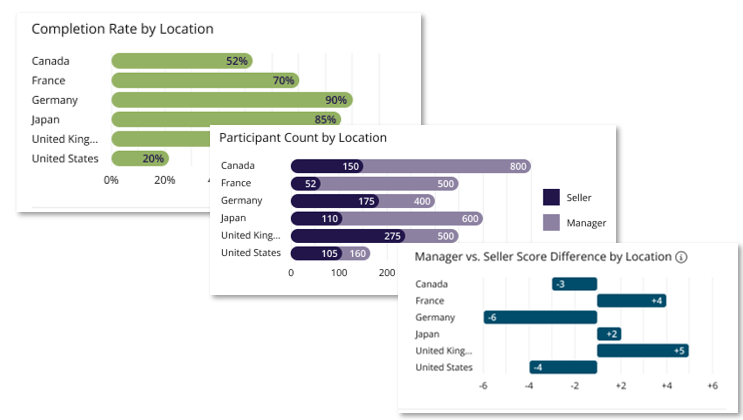
Completion Rate by Location: % of users (with assigned reviews) who have completed them.
Participant Count by Location: Shows how many users and managers have submitted reviews. Includes all completed self-reviews (users) and manager/coach reviews.
-
Manager vs. Seller Score Difference: Compares average self-ratings to manager/coach ratings. A positive value means users rated themselves higher; negative means managers rated higher.
Note: If your organization does not use “Location” fields, these charts will not display. If no data is available for the selected audience, a "No data available" message will appear.
4. What about content?
If mapped digital content exists for a behavior, it will appear in the Digital Content column.
If not, the widget will display “No content available.”
Why it matters
The Capability Action Planner gives your teams the insight and direction they need to drive improvement:
Clear visibility into capability review participation
Identification of key behavior gaps across teams and regions
Insight into how manager and team ratings align (or don’t)
Direct access to mapped digital learning content for fast, targeted action
Click here to explore the Capability Action Planner Widget and see it in action.